How to add an AI agent on top of your existing ITSM without replacing it
No, you do not need to replace your ITSM.
Two routes exist. Turn on the AI your ITSM vendor ships, which works inside its own ecosystem. Or add an overlay: an agent above your ITSM that reaches your identity, device and HR systems and acts in Slack or Teams.
Siit does both, and no data has to be migrated to start either way.
What Siit is
A complete AI service desk for internal IT and HR requests, operating in Slack and Microsoft Teams. It can run standalone as your system of record, or connect to the ITSM, identity, device and HR systems you already have.
What Siit is not
It is not a customer support tool: Siit answers employees, not customers. It is not a SaaS management or licence spend platform, and it does not replace asset lifecycle tracking or formal change management.
Running AI on top of my existing ITSM: the two routes
Concretely, an overlay AI agent connects to Jira Service Management, Freshservice or Zendesk through a two-way sync: employees ask in Slack or Microsoft Teams, the agent retrieves from Confluence or Notion, executes in Okta, Microsoft Entra ID, Jamf or Intune, and the ITSM keeps the ticket. Siit is a complete AI service desk that can run as your system of record, and it connects natively to those three through two-way sync, with control over what flows in each direction, when you would rather keep the ITSM you have.
If you already run an ITSM and you want an AI agent handling frontline employee requests, you have two routes. Both are legitimate. They reach different things.
| Criterion | Native ITSM AI | Overlay AI agent |
|---|---|---|
| Where it lives | Your ITSM's portal and its own channels | Slack and Microsoft Teams, above your ITSM |
| What it reads | Knowledge held in that vendor's ecosystem | Confluence, Notion and your ITSM knowledge base |
| What it does | Answers, deflects, summarises, routes | Answers and executes: access, provisioning, onboarding |
| Systems it reaches | The vendor's own suite | Identity, device, HRIS and ITSM |
| Request scope | IT requests inside that ITSM | IT and HR requests in one flow |
| System of record | The ITSM | Still the ITSM |
| Migration required | None | None |
The line that matters is not how well the AI writes. It is whether the AI suggests or executes.
An agent that drafts a reply saves an agent a minute. An agent that provisions the access, records the approval and closes the request removes the ticket.
How can you deploy Siit: service desk, overlay, or both?
Siit is not only an add-on. It is a complete service desk, and the deployment model is a decision you make rather than one the product makes for you.
Mode 1
Siit as your service desk
Siit is the system of record. Intake, ticketing, workflows, knowledge and reporting all live in Siit, with employees raising requests in Slack or Microsoft Teams.
Who it fits: teams with no ITSM in place, teams on a tool they have already decided to leave, and teams whose current portal is barely used.
Mode 2
Siit as a layer on top
Your ITSM stays the system of record. Siit becomes the intake and automation layer above it, connecting to Jira Service Management, Freshservice and Zendesk through two-way sync, with control over what flows in each direction, so tickets are not duplicated.
Who it fits: teams whose ITSM works, who have process and history invested in it, and who want a better front door rather than a migration.
Mode 3
Both, in parallel
The same two-way sync lets both systems run side by side. Some teams start with the layer, watch how many requests actually resolve in Slack, and use that evidence to decide whether the portal is still earning its place. Others keep both indefinitely.
Who it fits: teams evaluating a change without committing to it upfront. The migration page covers the sequential path, and running both systems side by side is a conversation to have with the team.
The rest of this guide focuses on Mode 2, because it is the one that raises the most technical questions. If you are considering Mode 1 or Mode 3, the mechanics below still apply: they describe what the agent reads, what it executes and how governance works in each of them.
Internal service desk or customer support AI
Two categories that search results routinely mix together need separating first.
An internal service desk answers employees. A customer support tool answers customers. Both deflect questions, both use AI, and their marketing pages look almost identical. What sits behind them does not.
| Criterion | Internal AI service desk | Customer support AI |
|---|---|---|
| Who asks | Your employees | Your customers |
| Systems it must reach | Identity provider, device management, HRIS, ITSM | Product documentation, CRM, order systems |
| Typical action | Grant an access, provision an account, onboard a joiner | Answer a question, check an order, escalate a case |
| Access control | Must respect what each employee is entitled to see | Public or account-scoped content |
| Where it lives | Slack or Microsoft Teams | Website widget, email, in-app messenger |
This matters when you are shortlisting. Ask a search engine how to add an AI agent on top of your service desk and a good share of the answers will be tools built for customer support. They are capable products, and several are excellent at what they do. They are not built to grant an access in Okta, read a device record in Jamf, or check an employment status in an HRIS. Where those actions are possible at all, they take custom integration work rather than a native capability.
If the requests you want automated end in an action on an internal system, the category you are shopping in is the internal service desk, not customer support AI.
Zendesk is the common exception. Plenty of IT teams run it as their internal helpdesk rather than for customers. Where that is the case it is treated as an ITSM throughout this guide, and Siit connects to it the same way it connects to Jira Service Management or Freshservice.
What does your ITSM's native AI already do?
The major ITSM vendors now ship an AI layer. ServiceNow, Atlassian, Freshworks and Zendesk all do, and for a real set of cases it is the right answer. Turn it on before you buy anything.
Jira Service Management
The virtual service agent can be configured two ways: intent flows, where you define a request type with training phrases and a guided conversation, and AI answers, generated from linked knowledge. Atlassian documents both configurations in its virtual agent product guide, and documents the Microsoft Teams, email and widget channels separately. If your documentation already lives in a well maintained Confluence space and your requests stay inside Atlassian, this covers a lot of ground.
Freshservice
Freddy AI covers suggested replies, knowledge content recommendations and article generation. Through AI Agent Studio, Freshworks positions it to resolve service requests end to end inside the Freshworks ecosystem and its connected apps, so this is not a suggestion-only layer. Freshworks documents how to connect knowledge sources to the AI agent in its support portal.
ServiceNow
ServiceNow ships conversational and generative capabilities across its platform under the Now Assist banner, strongest for organisations already running the wider suite.
These are included in your plan or sold as a tier upgrade, and the Jira Service Management virtual agent is a Premium feature. If your requests are contained within one vendor's ecosystem, native AI is usually the lowest-cost improvement available to your service desk.
Where does native ITSM AI stop?
Native AI is scoped to the vendor that built it. That scope is deliberate, and it produces three limits that IT teams hit quickly.
It sees one ecosystem
Your runbooks may sit in Confluence, your HR policies in Notion, your security procedures in a separate wiki. Native AI is built around the content its own vendor indexes. Connecting an outside source is possible on several platforms, and Freshservice documents how, but it is a configuration project rather than a default, and coverage varies by vendor and by plan.
It answers more readily than it acts
Deflecting a question about VPN setup is valuable. Granting the access, checking the manager approved it, and revoking it ninety days later is a different capability, and it requires reaching an identity provider such as Okta or Microsoft Entra ID.
It covers IT, not the whole request
A joiner needs a laptop, a Slack account, an identity group, a payroll record and a desk. That request crosses IT, HR and facilities. An ITSM-scoped agent handles the part that lives in its own queue. The rest stalls in email, and the employee has no idea where it stands.
What does an overlay AI agent add?
An overlay agent does not compete with your ITSM for the ticket. It sits in front of it and adds three things.
An intake where employees already are
Requests start in Slack or Microsoft Teams. The conversation is the request: no portal to teach anyone, no second login. Siit is Slack-first by design, and Microsoft Teams is a first-class channel rather than a bolt-on.
An agent that executes, not only answers
Siit's AI agents qualify and resolve employee requests, and record the actions they take together with the approvals attached to them. Where a request calls for an action, the agent performs it: pulling employee context from an HRIS such as BambooHR, Workday, Personio or HiBob, reading device data from Jamf or Microsoft Intune, routing the approval, then triggering provisioning through Okta or Microsoft Entra ID.
One flow for IT and HR
Cross-team coordination such as approvals, Finance confirmation, HR updates and employee follow-up usually sits outside the ITSM entirely. That gap is where requests stall. Siit's workflows handle cross-departmental routing in one place while your ITSM stays focused on incidents, problems and change.
Can an AI agent read Confluence, Notion and your ITSM knowledge base?
An AI agent is only as useful as what it can read. Siit connects to the places your documentation already lives, so your documentation does not have to be moved into a new knowledge base first.
Confluence
Siit's agents answer from your existing Confluence content directly in Slack and Microsoft Teams.
Notion
Siit connects to Notion, covering notes, docs and wikis, and answers from that content in the channel where the question was asked.
Your ITSM knowledge base
Solutions already written in Jira Service Management, Freshservice or Zendesk stay usable rather than being rewritten.
Two questions are worth putting to each vendor on your shortlist, including us: where is the access decision made, and can you audit it?
Siit does not import the access rules of your Confluence or Notion pages. Access is declared once, inside Siit: each article category carries an audience, and the agent answers a requester only from the categories that requester is entitled to see. You can also exclude a category from the sync entirely.
The trade-off is explicit. Connecting a knowledge source is a configuration step, not a passive mirror of your source permissions, and a restriction added later in Confluence is not picked up on its own. What you get in return is a single place to review and audit, uniform across all sources, that does not depend on an access-control sync staying accurate.
Does the agent train on your documentation, or read it at question time?
No, and the difference matters more than it sounds.
Teams often ask for an IT support AI trained on their internal documentation. What they usually want is an agent that answers accurately from their docs. Those are two different mechanisms, with different consequences.
| Criterion | Training or fine-tuning | Retrieval at question time |
|---|---|---|
| When your docs are read | Once, during training | At each question |
| Effect of an update | Requires retraining | Immediate |
| Traceability | Answers are not traceable to a source document | An answer maps back to what it was drawn from |
| Where your content ends up | Absorbed into model weights | Stays in your systems |
| Permission handling | Flattened at training time | Can be evaluated per request |
Siit retrieves. When an employee asks a question in Slack or Teams, the agent reads the connected sources at that moment and generates an answer grounded in what it retrieved. Correct a policy page this afternoon and the next answer reflects it. There is no retraining cycle, and your documentation is not absorbed into a model.
This also changes the security question you should be asking. With retrieval, the risk is not what the model memorised. It is what the agent is allowed to read, and on whose behalf. That is a question with a concrete, auditable answer.
How does a request move between Slack and your ITSM?
Siit connects natively to Jira Service Management, Freshservice and Zendesk via two-way sync, with control over what flows in each direction, so requests triaged in Slack or Microsoft Teams reach your existing workflows. The same sync runs with Linear for teams that track engineering work there, and to Trello and Intercom. The full capability table, including which integrations support configurable two-way sync, is published in the Siit ticketing integrations documentation, and the per-direction control is documented in the changelog.
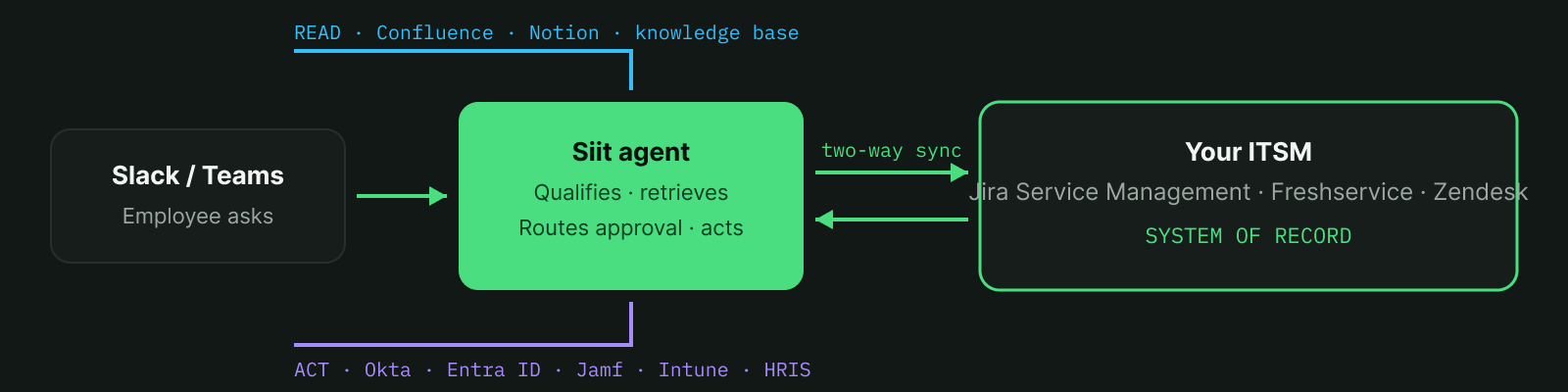
- The employee asks in Slack or Microsoft Teams
No portal to open, no form to find. The message is the request. - The agent qualifies it and reads context
It retrieves from your connected knowledge sources, pulls employee context from your HRIS, and reads device data from Jamf or Microsoft Intune. - It answers, or it executes
Routine questions are resolved in the conversation. Access requests run through the approval routing you define, then provisioning runs through Okta or Microsoft Entra ID. - Your ITSM stays the system of record
The corresponding ticket in Jira Service Management, Freshservice or Zendesk is created or kept in sync. Updates made in the ITSM flow back into the conversation, and replies in the conversation post back to the ticket.
The ticket lives in one place: Siit mirrors its state rather than creating a second record to maintain. Incidents, problems, change and assets keep living where they already live. The objects Siit exposes are documented in the Siit API reference.
How your data flows, and where it is held
Where does our data go is the question that stops most AI service desk projects, and it is answered with documents. Four of them should be on the table before a pilot.
What the agent reads, and on whose behalf
With retrieval, the agent reads from connected sources at question time rather than holding a trained copy of your documentation. The controlling question is which sources are connected, and whose permissions apply when a document is read.
What is sent to a foundation model
An AI service desk sends some content to a language model to generate an answer. Siit publishes Foundation Model Supplementary Terms of Service covering how models are used in the product, available through the Trust Center. Ask each vendor for the equivalent document, and read it alongside their subprocessor list.
Where processing happens
Siit maintains separate EU and US Data Processing Addenda, both available through the Trust Center. If you operate under GDPR, the DPA is the document that answers the residency question, not a marketing page.
What is recorded
Siit records the actions its agents take and the approvals attached to them, in an exportable trail. For an agent that grants and revokes access, that trail is the difference between an audit you can answer and one you struggle to.
Two public frameworks are worth reading before you evaluate any AI agent that touches internal systems: the NIST AI Risk Management Framework, and the OWASP Top 10 for LLM Applications. Both give you a vocabulary for the questions above that is independent of vendor marketing.
Can I trust an AI agent to grant access?
Before any AI agent touches a service desk, four questions need an answer. Ask them of each tool on your shortlist, including this one.
- What can it do without a human? Reading and answering is one class of action. Granting access is another.
- Who approves the rest? Approval routing should be yours to define, not inherited from the tool.
- Are decisions recorded? Not just the outcome, but what was read, what was concluded, and when.
- Can autonomy be reduced or stopped? Immediately, without raising a support ticket.
Let AI run the queue. You own the governance.
With Siit, grant and revoke actions run through your identity provider after the approval routing you define. Each action and its approval are recorded.
Security documentation, including the SOC 2 Type II attested report, the penetration test report, the EU and US DPAs and the subprocessor list, is available on request through the Siit Trust Center. Siit also publishes a security overview and a live status page.
What stays in your ITSM?
When Siit runs as a layer, it takes the employee request layer: intake, qualification, resolution and execution across IT and HR. It does not absorb the full range of functions of an ITSM platform, and it is not sold as one.
Formal change management, a configuration management database and IT asset lifecycle tracking stay where they are today. An overlay works alongside the platform your team already runs.
An overlay that claims to replace everything is a migration under another name. If a migration is what you want, decide it upfront rather than discover it halfway through a rollout.
Which approach fits your team?
Your knowledge and your requests both live inside one vendor's ecosystem
Start with the native AI. You are already paying for it.
Your documentation is scattered across Confluence, Notion and your ITSM
An overlay is the shortest path to complete context without running a content migration project first.
Your employees ask in Slack or Teams and ignore the portal
Meet them where they are. Monzo reports 28% of support tickets deflected that would otherwise have reached IT, and Airalo 50% of tickets automated after moving intake into chat. Portal deflection rarely improves through redesign alone.
Your requests cross IT, HR and Finance
An ITSM-scoped agent handles the IT slice. A cross-departmental agent handles the whole request.
You need the AI to grant, revoke and provision, not just answer
Check which identity and device systems the tool actually reaches, and what governance sits around those actions.
Your ITSM is already on its way out
Then the overlay is not the destination. Run Mode 3 for a period, keep both systems in sync, and consolidate once you have the evidence.
Related guides



FAQ

No. Siit can be deployed as a layer on top of the ITSM you already run. It connects natively to Jira Service Management, Freshservice and Zendesk through two-way sync, with control over what flows in each direction, so requests triaged in Slack or Microsoft Teams flow into your existing workflows without duplication, and your ITSM stays the system of record. Siit can also be deployed as a full service desk in its own right if you would rather consolidate. The deployment model is your decision, not a constraint of the product.
Yes. Siit's AI agents answer from existing Confluence content directly in Slack and Microsoft Teams. The content stays in Confluence: it is not copied into a separate knowledge base, and no migration is required.
Yes. Siit connects to Notion and answers from that content in the Slack or Microsoft Teams channel where the question was asked, so wikis and internal docs kept in Notion are usable without being rewritten.
No, and the distinction matters. Siit does not train a model on your documentation. It retrieves from your connected sources at the moment a question is asked, then generates an answer grounded in what it retrieved. In practice this means three things: updated documentation takes effect immediately with no retraining cycle, an answer can be traced back to the document it came from, and your content is not absorbed into model weights.
Both, and the choice is yours at deployment. Siit is a complete AI service desk with its own intake, ticketing, workflows and knowledge. It can run as your system of record, or connect to an existing ITSM such as Jira Service Management, Freshservice or Zendesk and act as the intake and automation layer above it. Teams also run both in parallel during a migration.